
Save articles, papers, and videos
Save web pages, YouTube videos, X posts, and papers to commonplot, upload PDFs and images, and follow import progress, summaries, and translation.
There are two ways to save something in commonplot: choose Save in Discover, or use New resource to paste a link or upload a file. commonplot fetches the full text and writes a summary, so you can read it, add it to a notebook, or give it to AI.
Save from Discover
Choose Save on a card or in the reader. Under Choose save destination, pick:
- Saved resources: everything you save, listed on your profile; or
- Any notebook: adding to a notebook also saves the item.
Saved items show Saved. Unsave removes the item from your saved resources and from every notebook.
Paste links
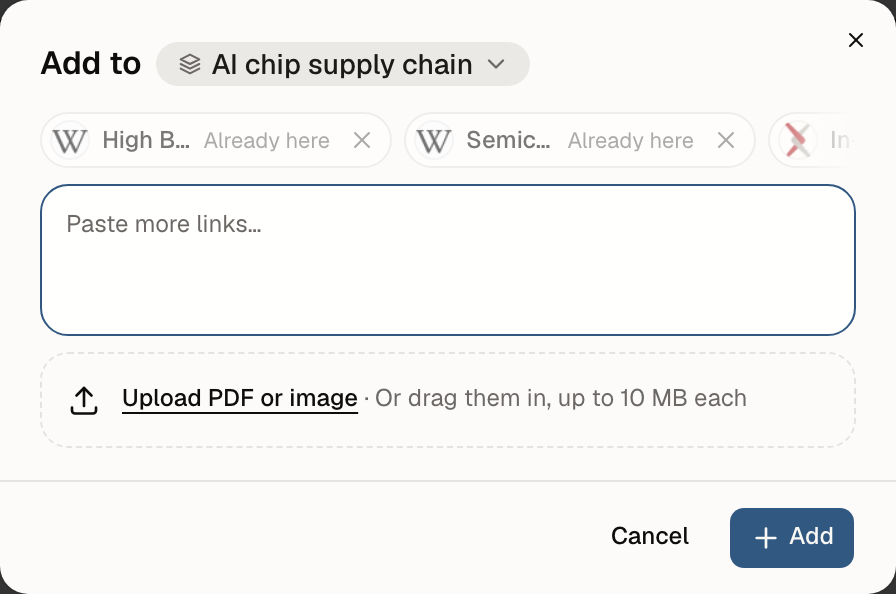
Choose Create → New resource, then Paste links. Supported:
- Web pages, blogs, and news articles
- YouTube videos
- X posts
- Academic papers (arXiv, DOI links, or journal pages)
You can add up to 20 at a time. Inside a notebook, items go to the current notebook by default; change it under Add to.
Upload PDFs and images
In the same dialog, choose Upload PDF or image, or drag files in:
- PNG, JPEG, GIF, WebP, and HEIC images
- Up to 10 MB each
Uploaded files are visible only to you and count toward your storage (500 MB on Free, 25 GB on Pro). Free allows 20 uploads a day; Pro allows 200.
commonplot identifies uploaded PDFs. If one is a known paper, it links to that paper's record, including authors, citations, and references.
Import progress
After you submit, commonplot works in the background, so you can close the dialog. Imports shows each item's status:
| Status | Meaning |
|---|---|
| Identifying, In progress | Fetching the content and writing the summary |
| Translating | Translating the full text |
| Ready to read | Done; you can read it or give it to AI |
| Ready to read · Translation failed | The original is readable, but translation didn't finish |
| Failed | The content couldn't be fetched; choose Retry |
While a PDF is still being parsed, you can already open the uploaded file.
Sites that require sign-in, block automated access, or are temporarily down may not yield the full text. See Troubleshooting.
Who can see what you save
- Links you save (web pages, videos, posts, papers) appear on your public profile, even if they are only in a private notebook.
- PDFs and images you upload are visible only to you.
See Profile and privacy.
Next step
Put related sources in one notebook so AI can read and compare them together: Organize research with notebooks.
Last updated on
Discover and read
Browse and search articles, papers, YouTube videos, X posts, and Hacker News threads in commonplot Discover, with bilingual reading, transcripts, and paper citations.
Organize research with notebooks
A commonplot notebook keeps one topic's resources, documents, AI chats, and audio overviews together. Learn to create one, add resources, and make it public or private.